
OAuth2.0
This API implements the OAuth2.0 protocol. Every request on this API must have a header "Authorization" with a bearer token :
Authorization: Bearer {token}
Get an access token
To get a token, there are two different ways, depending on the type of application you created
For a private application
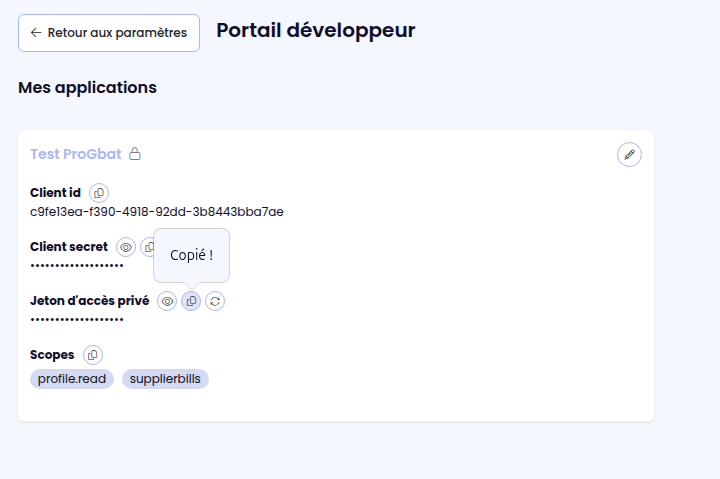
When you created a private application, the application is linked to your company and user account, with the privileges the creator have on the company account. This type of application does not need to follow the standard Oauth2.0 login protocol to generate a token, you can directly use the private token of your application as a bearer token, to call the API routes.
To get your private token, do on your "Portail développeur ProGbat" page on the application, and copy the property "Jeton d'accès privé".
For a public application
To generate a token from a public application, simply implement the Oauth2.0 login protocol with the following information :
Auth URL : https://api.progbat.com/v2/auth
Token URL: https://api.progbat.com/v2/token
Step1 - Authenticate the user
To generate a user token, your must first redirect the user to https://api.progbat.com/v2/auth with the following query parameters :
| Parameter | Required | Description |
|---|---|---|
| client_id | ✅ | The id of your application (provided by our team). |
| scope | ✅ | The scopes you want access with the token that will be generated, comma separated. |
| response_type | ✅ | Must be the string "code" |
| redirect_uri | ✅ | The endpoint the user will be redirected after authentication. On this endpoint, the token will be generated. |
| state | ✅ | A random string that will be returned to redirect_uri to ensure the authentication process security |
| pompt |
|
Step 2 : Generate a token
Once the user is authenticated and has validated the scope to accept your application access to his data on ProGBat, it will be redirected to the provided redirect_uri.
To generate the token, make a request POST https://api.progbat.com/v2/token. with the following body (JOSN or form urlencoded are accepted):
{
  "client_id" : "{your client id}",
  "client_secret" : "{your client secret}",
  "grant_type": "authorization_code",
  "code" : "{The code received by query string}",
  "redirect_uri" : "{The same redirect_uri as provided on authentication page}"
}
The response will be a JSON like
{
  "access_token": "string",
  "refresh_token": "string",
  "token_type": "string",
  "expires_in": 0
}
The property access_token has to be set in the next API calls, in the header Authorization: Bearer {access_token}
The property refresh_token has to be stored on your system, to be used to refresh token later.
Refresh a token
When generating token from an authorization code, an access_token and a refresh_token are returned by the API. The refresh_token can be stored in your system to generate a new token later, without user authentication.
To refresh a token, make a request POST https://api.progbat.com/v2/token with the following body :
{
  "client_id" : "{your client id}",
  "client_secret" : "{your client secret}",
  "grant_type": "refresh_token",
  "refresh_token": "{The stored refresh_token}"
}
A refresh token can be used 50 times before expiration. At the 50th usage, a nex refresh_token is created and the old one is invalidated. It means that you need to store the new returned refresh_token for your future requests.